How to practise a song — not just sing along to it
Most "song practice" is a performance: play the track, sing the whole thing, feel roughly how it went, repeat tomorrow. That rehearses the parts you already sing well and leaves the two bars you actually miss exactly where they were. Here is the loop that fixes them — find the misses, drill that stretch against a backing track with your pitch on screen, then re-measure.
Why singing along isn't practice
Three things go wrong when a full run-through is your whole practice session:
- You spend most of it on what already works. If four bars out of forty are the problem, singing the song ten times gives those bars ten attempts and everything else four hundred. Practice time follows the song's structure instead of your weaknesses.
- The backing track hides the error. A full mix is generous — it masks a note that's 30 cents flat, especially in your own ears while you're producing it. You finish thinking it went fine.
- There's no direction to the feedback. "That chorus felt shaky" doesn't tell you whether you were sharp or flat, on which syllable, or whether it's the entry or the sustain. Without direction, the next attempt is a guess.
None of that means run-throughs are useless — they're how you practise stamina, phrasing and performing. They're just the wrong tool for fixing a note.
The loop that does work
- Sing it once, with a pitch trace running. Use the tuner or a scored run and watch where the line leaves the target. Almost everyone is surprised here: the trouble is usually two or three specific spots, not "the chorus".
- Enter just that phrase. Four to eight bars in the melody editor is plenty — place the notes at the right pitch and beat, and set the tempo. You're building a target lane, not transcribing the song.
- Attach the accompaniment. Drop in an audio file as a backing track. Practising in the song's harmonic context matters, because that's where intonation errors actually live — a note that's fine alone can drift once there's a chord under it.
- Drill the stretch, not the song. Run only the section you're fixing, over and over, reading the error in cents after each attempt. Ten focused repetitions of four bars beat one more lap of the whole track.
- Re-measure. When the stretch scores clean, sing the whole song again and compare with your first run. That difference — not how it felt — is the evidence.
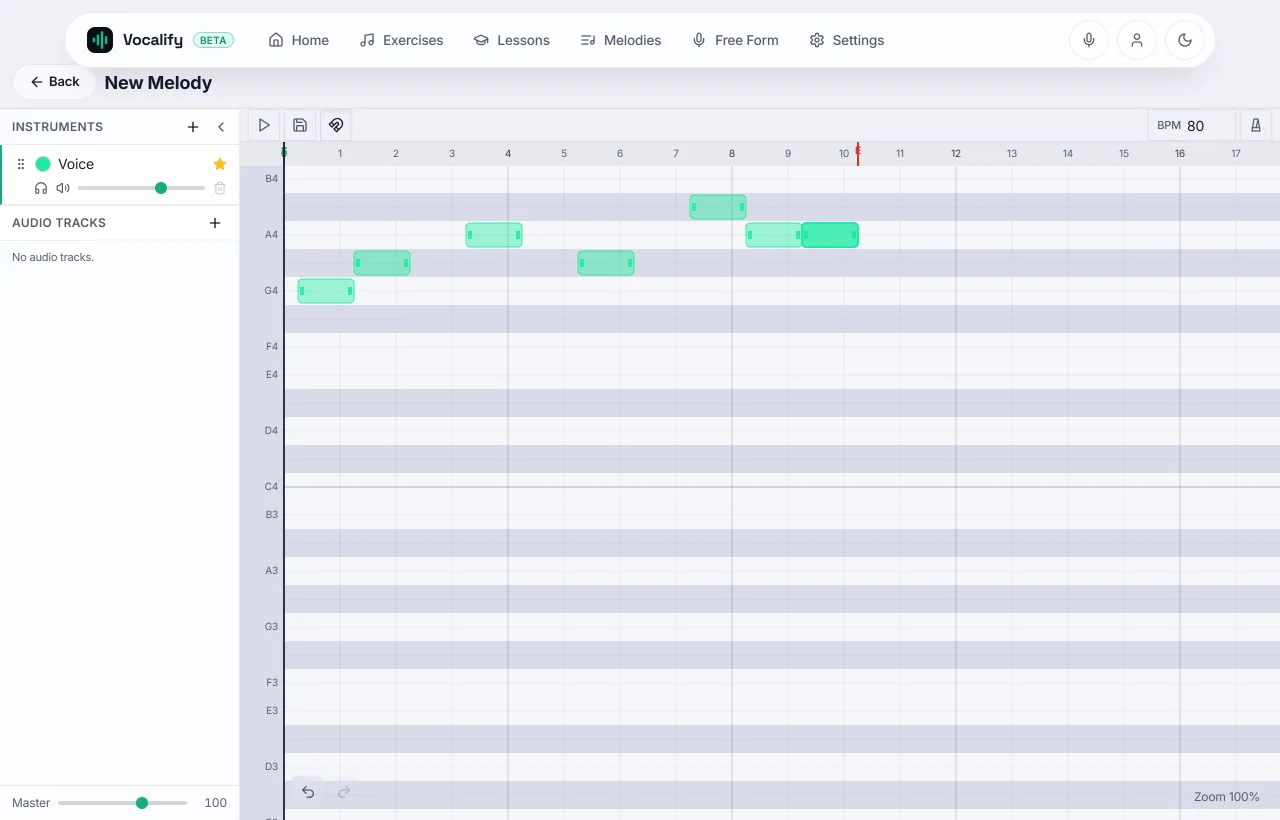
You don't have to split the song up by hand. On the run preview you can drag across the stretch you want and practise only that — or, if the melody has named parts like verse and chorus, pick the part and run it on its own, with its own score. Same melody, same backing track, just the bars you're actually fixing.
Getting an accompaniment to practise against
You have three options, in ascending order of effort:
- Nothing. Drill the phrase against the target notes alone. Fastest, and honest — nothing masks the pitch. Start here.
- A simple guide. A metronome, or the melody itself played back on an instrument. Enough to fix timing without hiding you.
- The real accompaniment. Any audio file works as a backing track. If all you have is the full recording with the original vocal on it, splitting it into accompaniment and vocals gives you a track to sing against instead of alongside — a free account includes one split per day, and Vocalify Pro removes that daily limit.
Wear headphones with any of them. Otherwise your microphone hears the track as well as you, and the pitch trace gets confused about whose note it's drawing.
If the song sits too high
Common and fixable: transpose the melody down until it's comfortable, drill it there, then move it up a semitone at a time. Repeatedly hauling at notes above your current range trains tension, not the song. If you don't know where your ceiling is, the range test takes a minute, and how to sing higher covers moving it upward safely.
Where this fits with the rest
Song work is where technique gets spent, not where it's built. If the same kind of miss keeps appearing across different songs — flat entries, a break in the same place, drifting on long notes — that's a fundamentals problem, and the drills in how to sing in tune, range and ear training fix it faster than any amount of repertoire. Use songs to find the weakness; use drills to remove it.
Frequently asked
Is a karaoke app good for learning to sing?
For enjoyment and performance rehearsal, yes. For fixing pitch, it's weak: you get lyrics and timing but no information about where your note actually landed, and the mix covers small errors. Use karaoke to perform, and a pitch-scored drill to improve.
How long should I drill one phrase?
Short and often. Ten focused repetitions most days beats an hour once a week — and the voice tires, so quality collapses long before the hour is up. Stop when the line stops improving, not when you're hoarse.
Do I have to enter the whole song?
No, and you shouldn't. Enter the bars you miss. A four-bar melody you drill fifty times is worth more than a full transcription you sing twice.
Can I practise a song without an account?
The built-in exercises and the free tools run without signing in. Saving your own melodies needs a free account, because they have to live somewhere — see what needs an account and what doesn't.
Fix the two bars you keep missing
Enter the phrase, attach the accompaniment, drill the stretch on loop — and watch the score move.
Open the editor