Online vocal tuner
A live singing pitch monitor, right on this page: press start, sing, and watch your voice drawn on a piano roll in real time with the note you're on labelled as you go. No install, no account — and your microphone audio stays on your device.
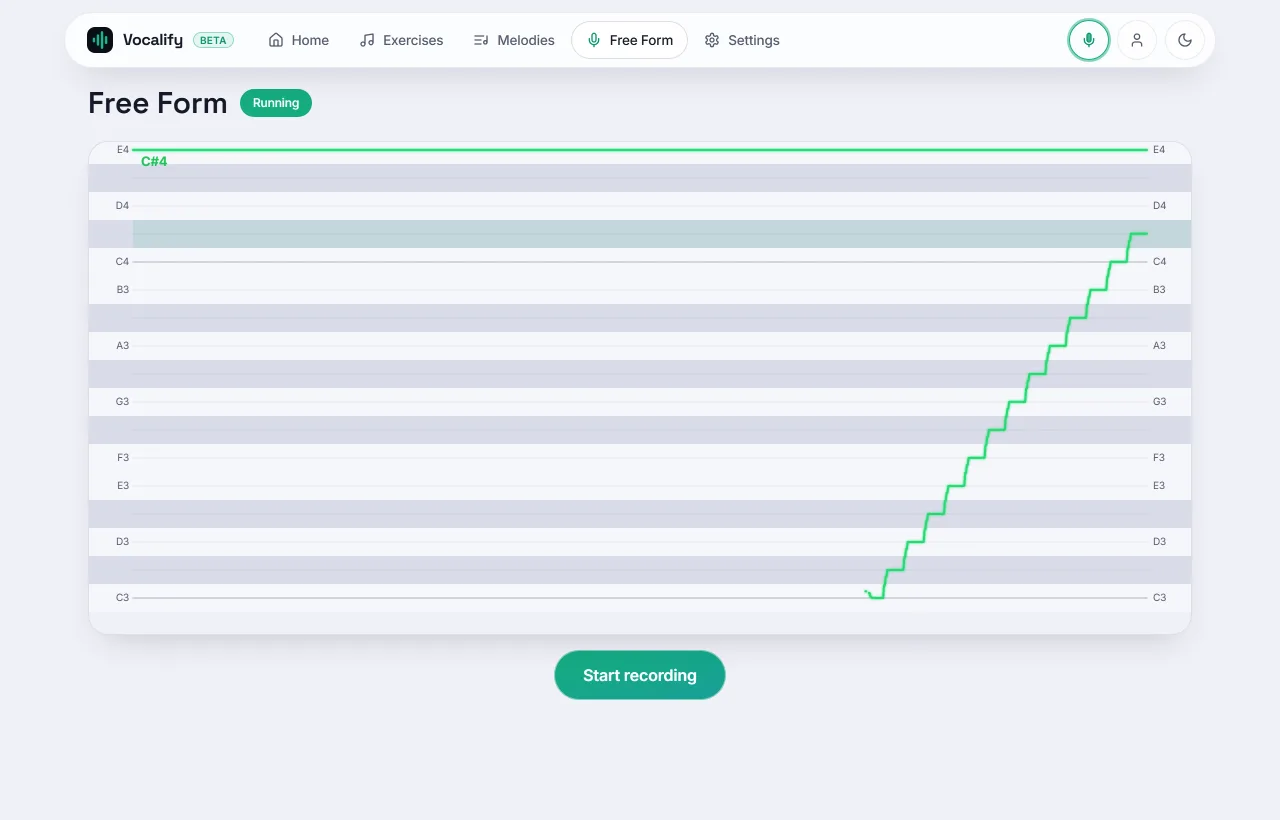
Allow microphone access and sing. Pitch is detected in your browser — nothing is uploaded.
What it does
The tuner listens to your microphone and detects your pitch many times a second, drawing it as a continuous line against a piano-roll grid. Unlike a guitar tuner's single needle, you see the shape of what you sing — steady notes, slides, wobble and drift — which makes it a fast way to spot and fix intonation problems.
How to use it
- Press start above and allow microphone access.
- Sing a steady note. Aim to keep the line flat and centered on a grid line — that's an in-tune, stable pitch.
- Try a slide or a scale. Watch the line climb note to note; smooth, even steps mean clean intonation.
- Check problem notes. Sing a phrase you struggle with and see exactly where the line drifts flat or sharp.
Pitch is detected in your browser. Your microphone audio is never uploaded — nothing leaves your device. Use headphones in a quiet room for the cleanest reading.
Tuner vs. guided practice
The tuner is perfect for exploring and checking. When you want to improve on purpose, switch to guided drills: they add target notes to aim at and score every run so you can track progress. Start with singing in tune, or map your vocal range first so exercises fit your voice.
Why a voice tuner is not a guitar tuner
A chromatic tuner is built for an instrument that holds one pitch: it shows a needle, you turn a peg, the needle centres. Point one at a voice and it fights you, because everything a voice does on purpose looks like error to a needle.
- Vibrato is a deliberate oscillation of several cents either side of the note. A needle reads it as instability; a line shows it as an even wave, which is what you want to see.
- Onsets and slides. Voices approach a note from somewhere. A needle only ever reports "now", so it cannot tell a clean attack from a scoop up to the pitch — the most common intonation fault there is.
- Consonants and breath are unpitched. A needle jumps; a line simply breaks, which reads correctly.
That is why this tool draws pitch over time on a piano roll instead of pointing a needle. You are looking at the shape of a phrase, not a single instant of it.
Reading the display
- The grid lines are notes. Each horizontal lane is one semitone, labelled with its note name; the line you draw is where your voice sits between them.
- The offset is in cents. A hundred cents is one semitone. Trained ears start hearing an error at roughly 10–20 cents on a sustained note, so a line sitting a third of a lane off the centre is audibly flat, not a rounding artefact.
- Flat versus drifting. A line that starts centred and sags is a support problem. A line that is parallel to the lane but offset is a targeting problem. They need different practice, and only a time display tells them apart.
Is this autotune?
No, and the difference is the point. Autotune changes the sound — it moves your recorded pitch onto the nearest note so the output is in tune whether or not you were. A tuner changes nothing; it shows you what you sang. Practising against autotune teaches you nothing, because the feedback has been corrected before it reaches you. If you want your singing to improve rather than your recording, you want the unflattering version.
Getting an accurate reading
The tool is only as good as what reaches the microphone, and three things routinely spoil it:
- Speakers. If anything is playing back, the microphone hears it as well as you. Use headphones — wired for preference.
- Bluetooth. Wireless earphones add output delay, so anything you sing along to arrives late relative to what you hear. It does not affect the pitch reading itself, but it does affect timing-based feedback. See singing apps on iPhone.
- Phone voice processing. Noise suppression and automatic gain control are on by default on most phones and smooth exactly the quiet parts of a note where drift starts. Singing apps on Android covers what to turn off.
Then sing a sustained vowel — "ah" or "ee" — rather than words. Consonants have no pitch, so a lyric produces a dotted line and a vowel produces a solid one.
Frequently asked
Is it really free?
Yes — no install, no account, nothing to sign up for. It runs on this page.
What do I need?
A modern browser and a microphone. Headphones and a quiet room improve accuracy.
Why does the line jump or disappear?
Background noise, very quiet or breathy notes, and consonants can confuse any pitch detector. Sing a clear, sustained vowel for the steadiest line.
Is there a web version of Vocal Pitch Monitor?
This is the closest equivalent. Vocal Pitch Monitor is an Android-only app that draws a live pitch trace; this page does the same thing in any browser, on any platform, with nothing to install. The difference is that here the trace is one of several tools — the range test and the app's scored drills add targets and a history, which a bare monitor cannot give you.
Can I test my singing voice online without downloading anything?
Yes, and in three ways, all on this site: this tuner shows what you sing, the range test measures how far your voice reaches, and the pitch discrimination test measures what you can hear. None of them needs an account.
Can I set the reference pitch or tune manually?
The tuner is fixed at A4 = 440 Hz, the standard concert reference, and labels the nearest note automatically rather than asking you to pick a target. If you want to aim at a specific note and be scored against it, that is what the exercises are for — pick the note, sing, and get an average error in cents for the run.
Practise against target notes
The tuner shows what you sang. The full app adds target notes, scoring and a practice history — free, in your browser.
Open the full tuner in the app